No posts in a very long time....
I've been writing some of the most challenging code in my career. It's been a lot of fun.
Coding should be fun (work should be fun). With a good job, you should feel rewarded at the end of a long day. For those of us creating software and systems, we need to keep our creative juices going and do new and challenging things. This is what my last few years have been.
However, no posts in a very, very long time....
Monday, April 16, 2018

Friday, June 17, 2016
Embedded Python
In a previous post on Python, "why I like Python", I discussed how I am really liking Python. For years I did very little with Python because all our scripts were Perl or shell. My teams were comfortable with Perl when they needed to write complex scripts. However, we now are refreshing technology and Python is an excellent choice.
A few years ago I read about the ESP 8266 wifi module. This $2US module is great for adding wifi to Arduino systems via a serial interface. Last fall, I saw an article about a really cool new ESP 8266
module, the NodeMCU. However, the NodeMCU comes with the language Lua installed which is a yet another scripting language. Then I found MicroPython!
MicroPython allows Python3 to run on bare metal! This means that the system comes up with the Python REPL (Read Evaluate Print Loop) interface -- a Python prompt. You can program the NodeMCU (or other device) via a USB interface using a terminal program like Picocom, or via a simple web-based program WebREPL. Note that WebREPL also allows one to write Python scripts or other files directly to a virtual disk on the device.
Boards that can run MicroPython are available from:
A few years ago I read about the ESP 8266 wifi module. This $2US module is great for adding wifi to Arduino systems via a serial interface. Last fall, I saw an article about a really cool new ESP 8266
module, the NodeMCU. However, the NodeMCU comes with the language Lua installed which is a yet another scripting language. Then I found MicroPython!
MicroPython allows Python3 to run on bare metal! This means that the system comes up with the Python REPL (Read Evaluate Print Loop) interface -- a Python prompt. You can program the NodeMCU (or other device) via a USB interface using a terminal program like Picocom, or via a simple web-based program WebREPL. Note that WebREPL also allows one to write Python scripts or other files directly to a virtual disk on the device.
Boards that can run MicroPython are available from:
- The MicroPython web site at micropython.org
- The Adafruit site (Huzzah) at adafruit.com
- Amazon, Ebay, and Aliexpress
For the NodeMCU, the documentation can be found at MicroPython on the ESP8266
I will post more here after I play with my NodeMCU a bit more!
Happy Hacking!
 I am a engineer/MBA developer/manager focusing on open source solutions. I manage several teams, most working with Linux solutions.
Monday, February 8, 2016
The Next Big Thing
Which of these will be the "Next Big Thing"?
- Internet of Things (IoT)
- Roll-up OLED displays
- Personal Space Travel
Last year a company found how to shake up the razor market.
Will it be a company shaking up the garbage market? The baking market?
Wired Next Big Thing
Will it be an evolution of something that is already taking off like Cloud computing, docker, containers, big data?
Will it be personal space travel?
What are your thoughts on The Next Big Thing?
I am a engineer/MBA developer/manager focusing on open source solutions. I manage several teams, most working with Linux solutions.
Tuesday, January 5, 2016
Love the USPS
USPS is on our Naughty list this year.
Our son Will and his new wife moved about an hour away and did a change of address for Will Hampton V and Lohryn Hampton. Suddenly, we were receiving no mail at our house for anyone including us (Wade and Laura).
We found out that the USPS only looks at the first letter of the first name and first 4 letters of the last name, not full name, and especially not suffixes (I'm IV, he's V), so all mail to W Hamp or L Hamp went to my son's new address an hour away (via a post office near Manassas, VA). All mail took an extra week or more, then they had to meet up with us to give it to us. To make matters worse, his wife had health issues and ended up in the hospital an hour away from their house (2 hours from us).
I went in to the USPS and did the form to revert it. At the time, they said it was OK and should be fixed in a couple of days (up to a week -- why so long?). A week later, I went in again and they said the form was incorrect and had to be done differently, plus explained the first letter of first name, etc. rule. Nice of them to explain that now, but why not when the first forwarding was done?. The next day we called and they said they did a computer entry and it was now fixed. A few days later it still was not fixed and required yet another visit and form. Eventually, it took multiple visits by my wife and me to get it fixed.
It took nearly a month to fix the forwarding problem, which is simply an entry in a computer and updates at the local office. That's efficiency!
This snafu messed up Christmas gifts, bills, invitations, etc.
Warning: this can happen to you too (a co-worker had a similar experience)....
Our son Will and his new wife moved about an hour away and did a change of address for Will Hampton V and Lohryn Hampton. Suddenly, we were receiving no mail at our house for anyone including us (Wade and Laura).
We found out that the USPS only looks at the first letter of the first name and first 4 letters of the last name, not full name, and especially not suffixes (I'm IV, he's V), so all mail to W Hamp or L Hamp went to my son's new address an hour away (via a post office near Manassas, VA). All mail took an extra week or more, then they had to meet up with us to give it to us. To make matters worse, his wife had health issues and ended up in the hospital an hour away from their house (2 hours from us).
I went in to the USPS and did the form to revert it. At the time, they said it was OK and should be fixed in a couple of days (up to a week -- why so long?). A week later, I went in again and they said the form was incorrect and had to be done differently, plus explained the first letter of first name, etc. rule. Nice of them to explain that now, but why not when the first forwarding was done?. The next day we called and they said they did a computer entry and it was now fixed. A few days later it still was not fixed and required yet another visit and form. Eventually, it took multiple visits by my wife and me to get it fixed.
It took nearly a month to fix the forwarding problem, which is simply an entry in a computer and updates at the local office. That's efficiency!
This snafu messed up Christmas gifts, bills, invitations, etc.
Warning: this can happen to you too (a co-worker had a similar experience)....
I am a engineer/MBA developer/manager focusing on open source solutions. I manage several teams, most working with Linux solutions.
Monday, January 4, 2016
Self Replicating Machines
Can machines reproduce or replicate? Reproduction implies the ability to mutate and implies evolution. Machines need to replicate, or make new copies of themselves with the same capabilities as the original (typically at the macro level).
See: Wikipedia entry on Self-replicating machines
This is a very good book on self replication: Kinematic Self-Replicating Machines (read it on-line).
What happens when we make machines that can replicate (or even reproduce)?
Years ago, I read several of the Berserker SF stories by Fred Saberhagen. Basically, some race millions of years ago created self-replicating war machines and we discovered them near the center of the galaxy. It scared me so much that I didn't sleep well for weeks.
Berserker Fan Site
What are your thoughts on self-replicating machines?
Will this be a problem?
Will this be the next level after the singularity?
I am a engineer/MBA developer/manager focusing on open source solutions. I manage several teams, most working with Linux solutions.
Friday, December 4, 2015
Why I Like Python
Python is a simple, easy-to-learn language that is in widespread use, especially in the open source community. In most Linux distributions(Fedora, CentOS/RHEL, Ubunu/Debian) many system tools are written in Python and it is used for GUI configuration tools, for example with Python+GTK. It is largely replacing Perl and other languages for scripting tasks.
The language syntax is simple and easy to learn. The simple syntax encourages best programming practices. Variables are defined when they are used and the data types are easy to understand. As a result Python is being taught as a first computer language in middle schools through colleges.
Python is mainly an imperative programming language supporting both functional programming like C, and object oriented capabilities like C++/Java (python classes). However, Python has some features that allow it to be used as a declarative programming/functional programming language such as its lambda function.
The language has many features that make it ideal for solving fairly complex problems:
Most Python code is interpreted and runs in the C-based Python interpreter (cPython). However, there jPython allows Python to run in the Java virtual machine and there is even a micropython that allows a subset of Python to run on bare metal in a microcontroller: https://micropython.org/
Perl is great for small, quick scripts, but Python is better for larger, complex scripts, and for jobs that would have been implemented in C/C++/Java a few years ago, such as signal processing or analysis of large data sets. Some functionality such as regular expressions and system calls are easier in Perl. However, Python is much cleaner, resulting in code that is easier to understand, share, and reuse. If you share it or must maintain it, Python is the preferred language.
Python is also challenging Matlab/Octave for engineering tasks and signal processing. Numeric Python (Nympy), Scientific Python, Astro Python, and Matplotlib (http://scipy.org/) are several of the projects extending Python for scientific processing. Many of the features that can be done in Matlab/Octave can now be done easier in Python, and since Python is a more mainstream language, they can be understood by a wider audience.
Some useful links:
The language syntax is simple and easy to learn. The simple syntax encourages best programming practices. Variables are defined when they are used and the data types are easy to understand. As a result Python is being taught as a first computer language in middle schools through colleges.
Python is mainly an imperative programming language supporting both functional programming like C, and object oriented capabilities like C++/Java (python classes). However, Python has some features that allow it to be used as a declarative programming/functional programming language such as its lambda function.
The language has many features that make it ideal for solving fairly complex problems:
- forced structure with indents, optional “;”, and no “{}” for loops/procedures
- quick startup and runs fast (slower than compiled languages, however)
- interpreted, but modules are byte-compiled, which improves speed
- widely used in open source projects
- supports multiple graphical extensions such as GTK for development of GUIs
- included in most Linux distributions
- very extensive set of standard modules
- many add-on modules from many sources
- numeric python and scipy are great for scientific and engineering tasks/data analysis
Most Python code is interpreted and runs in the C-based Python interpreter (cPython). However, there jPython allows Python to run in the Java virtual machine and there is even a micropython that allows a subset of Python to run on bare metal in a microcontroller: https://micropython.org/
Perl is great for small, quick scripts, but Python is better for larger, complex scripts, and for jobs that would have been implemented in C/C++/Java a few years ago, such as signal processing or analysis of large data sets. Some functionality such as regular expressions and system calls are easier in Perl. However, Python is much cleaner, resulting in code that is easier to understand, share, and reuse. If you share it or must maintain it, Python is the preferred language.
Python is also challenging Matlab/Octave for engineering tasks and signal processing. Numeric Python (Nympy), Scientific Python, Astro Python, and Matplotlib (http://scipy.org/) are several of the projects extending Python for scientific processing. Many of the features that can be done in Matlab/Octave can now be done easier in Python, and since Python is a more mainstream language, they can be understood by a wider audience.
Some useful links:
I am a engineer/MBA developer/manager focusing on open source solutions. I manage several teams, most working with Linux solutions.
Wednesday, November 4, 2015
The Connected Office
In today's world, it is not sufficient to use standalone word processors and e-mail for collaboration. In the Windows world, many have embraced Sharepoint and it seems to be the one-size-fits-all shoebox that is used whenever collaboration is mentioned. For example we have seen migration of well-functioning web sites to Sharepoint as "that is the standard" -- this seems to be the mantra.
However, one-size-fits-all is rarely a good model. This is especially true if you need to be cross-platform and if you want to base your tools in open source technology.
Today, we still need our standalone tools like spreadsheets, word processors, and presentation tools, but we also need many social and collaborative tools including blogs, wikis, discussion boards, collaborative editors, content management systems (CMS), shared file repositories, bug tracking systems, configuration management systems, and many other types of collaborative, social, shared systems/applications.
These shared systems should be accessible both via standard "accessibility" requirements but also via the wide assortment of devices users now have. The tools need to be:
It is no-longer adequate to email a document from one user to another every time we have data to exchange.
This site has on open source suite that looks very interesting: http://cynapse.com/cyn-in/
Does anyone have any recommendations for tools? Any experience with modern, secure collaboration that goes beyond e-mail or Shrepoint?
However, one-size-fits-all is rarely a good model. This is especially true if you need to be cross-platform and if you want to base your tools in open source technology.
Today, we still need our standalone tools like spreadsheets, word processors, and presentation tools, but we also need many social and collaborative tools including blogs, wikis, discussion boards, collaborative editors, content management systems (CMS), shared file repositories, bug tracking systems, configuration management systems, and many other types of collaborative, social, shared systems/applications.
These shared systems should be accessible both via standard "accessibility" requirements but also via the wide assortment of devices users now have. The tools need to be:
- low-cost (preferably free and open source)
- cross platform (Linux, Mac, Windows, Android, iPhone)
- support multiple form factors (desktops, laptops, tablets, phones)
- easy to use
- secure (not tied to a big company like Google or Microsoft)
It is no-longer adequate to email a document from one user to another every time we have data to exchange.
This site has on open source suite that looks very interesting: http://cynapse.com/cyn-in/
Does anyone have any recommendations for tools? Any experience with modern, secure collaboration that goes beyond e-mail or Shrepoint?
I am a engineer/MBA developer/manager focusing on open source solutions. I manage several teams, most working with Linux solutions.
Wednesday, October 14, 2015
Will Your Job Be Replaced
I recently came across this job loss calculator which allows you to estimate if your job will be replaced by machines.
As a Software Developers Systems Software, I would have a 12.8% chance of being replaced by a machine. As a EE I would have about 10.2% chance. As a Computer and Information Systems Manager, I would have a 3.5% chance. Maybe I should keep my fingers in all three.... (Of course, I may retire before being replaced which would be great for me, but....).
I am a engineer/MBA developer/manager focusing on open source solutions. I manage several teams, most working with Linux solutions.
Tuesday, September 1, 2015
Photo Editing on Linux
On September 26, 2015, I will be at FREDLUG at the England Run library in Fredericksburg, VA discussing photo and video editing on Linux. I will be working with a couple of other presenters on the agenda My focus will be on photo editing and managing photo collections using Linux. This subject is dear to me as I have been processing photos on Linux for many years for my kids Cheerleading competitions, Karate events, Weddings, family photos, nature photos, etc.
I frequently take photos of a very wide range of subjects:
When processing photos on Linux, I primarily use these tools:
Some image software and editors I have yet to try, but am interested in:
Update: 9/28/2015: The presentation went very well. We demonstrated a lot of applications and captured from a webcam, Celestron microscope, and the Canon 50D!
I frequently take photos of a very wide range of subjects:
- Art: museums, sculpture, paintings, family-created art
- Astronomy: astrophotography, planets, sunrise, sunset
- Family: kids, weddings, Christmas and related events
- Nature: day and night, forests, mountains, waterfalls, trees, sunrise/sunset
- Photo art: creative shots with multiple cameras, creative post-processing, etc.
- Scanned images: from film typically including very old family photos
- Scanned documents including some 100-year-old telegrams
- Sports: Cheerleading, football, and karate
- Technical: circuits, equipment, Arduino, buildings, family inventory
- Travel: ancient sites, interesting structures, Churches, Mosques, Temples, Wats
- Canon 50D and 350D, plus other Canon and Nikon SLRs, and mirrorless systems
- Celestron and generic digital microscopes
- Multiple web cams
- Raspberry Pi camera module (5MP)
- Point and shoot digital cameras including Nikon Coolpix, Olympus, and others.
- Canon AE1 Program, EX-Auto, and misc other film cameras and SLRs
- Scanned images from family pictures, some over 100 years old
I have used many lenses on the SLR cameras including 50mm 1.8, 20mm, zoom lenses, etc.
When processing photos on Linux, I primarily use these tools:
- GNU Image Manipulation Program (GIMP) for editing images and graphics
- Shotwell: Comes with the Gnome desktop
- Digikam: Full image processing collectcion
- Darktable: good for processing batches of raw pictures including RAW photos
- Picasa from Google, Windows only but works great under Wine
- OpenOffice/LibreOffice draw for printing small/large/custom images
Note, Picasa is not open source but works well for non-destructive editing of large sets of photos. I began using it years ago, so still use it to organize the huge sets of photos I manage. I still use Picasa as it is fast and does retouch well, but am considering moving to Digikam.
This is a good review of image editors for Linux at techradar.com.
This is a good review of image editors for Linux at techradar.com.
For processing RAW images I have used multiple tools. I really liked RawStudio, however the link at http://www.rawstudio.org seems to be broken so I used the link to github. RawStudio seems to have less support so I am leaning towards Darktable.
- Darktable: seems slower than RawStudio, good for batches of images
- RawStudio: good for batches of images, seems to be dying or not well supported
- UFRaw: good for single images
Some image software and editors I have yet to try, but am interested in:
- RawTherapee for processing raw images
- RegiStax for image stacking (Window, run with wine?) -- closed source
- AfterShot Pro from Corel (commercial, not-free or open source)
- Photivo photo processor
- LightZone digital darkroom software
My next mission is to move from Picasa to a fully-open-source image processing workflow stream that is compatible with the current version of Fedora and that supports my existing photo hierarchy. I will post my progress in this task in future blog entries.
I may have to stick with RegiStax for stacking astro images.... Again this will be the subject of a future blob posting on Astronomical Image processing on Linux.
I have stitched together some panorama images using Hugin with excellent results. I also tried to make HDR images using Luminance HDR (with varying degreees of success).
I have stitched together some panorama images using Hugin with excellent results. I also tried to make HDR images using Luminance HDR (with varying degreees of success).
Many cameras can be directly controlled from Linux using Gphoto2, for example I can change the ISO, shutter speed, aperture, and shutter for my 50D. I can command the camera to take 20 pictures, 1 second apart, and download them all from a script. Great stuff and also the subject of a follow-on post....
I have done only a little video processing on Linux. The options here are not as mature.
I will do a post in the future about Video on Linux including my experience with Kino and Kdenlive. This seems to be an interesting Linux video editor review at linux.com.
Update: 9/28/2015: The presentation went very well. We demonstrated a lot of applications and captured from a webcam, Celestron microscope, and the Canon 50D!
Some of my photography can be seen at: https://wadesfavorites.shutterfly.com/.
Enjoy!
I am a engineer/MBA developer/manager focusing on open source solutions. I manage several teams, most working with Linux solutions.
Monday, August 31, 2015
Google EU Law Notice
I just got this from Google. Interesting. Glad they are trying to take privacy seriously.
However here in the states we have more and more hacks, like the OPM breach.
Google's quote: "European Union laws require you to give European Union visitors information about cookies used on your blog. In many cases, these laws also require you to obtain consent.
As a courtesy, we have added a notice on your blog to explain Google's use of certain Blogger and Google cookies, including use of Google Analytics and AdSense cookies.
You are responsible for confirming this notice actually works for your blog, and that it displays. If you employ other cookies, for example by adding third party features, this notice may not work for you. Learn more about this notice and your responsibilities."
Yes, I am confirming that it works as it really does not matter for this at this point.
However here in the states we have more and more hacks, like the OPM breach.
Google's quote: "European Union laws require you to give European Union visitors information about cookies used on your blog. In many cases, these laws also require you to obtain consent.
As a courtesy, we have added a notice on your blog to explain Google's use of certain Blogger and Google cookies, including use of Google Analytics and AdSense cookies.
You are responsible for confirming this notice actually works for your blog, and that it displays. If you employ other cookies, for example by adding third party features, this notice may not work for you. Learn more about this notice and your responsibilities."
Yes, I am confirming that it works as it really does not matter for this at this point.
I am a engineer/MBA developer/manager focusing on open source solutions. I manage several teams, most working with Linux solutions.
Tuesday, June 16, 2015
Rise of the Machines!
Could your job be at risk from robots?
Technology has been displacing blue collar workers for centuries including the automobile (replacing teamsters) and factory automation (your car was built by robots). Recently, we have seen a rise in automated checkout systems. Smart technology is now threatening white collar jobs including attorneys.
One argument against the rise of the minimum wage is that if it were to rise, companies that typically hire a lot of minimum wage staff like the fast food industry might turn to robots. Although McDonalds deny that they plan on moving to robots, they have a new McDonald’s In Phoenix Run Entirely By Robots. Is this the way of the future?
What will happen to the workplace? Will we all become button pressers like George Jetson?
Extrapolating the rise of machines and especially artificial intelligence has led to some theorizing that we soon will witness the Technological Singularity. This would be a point in time with
When could the Technological Singularity occur? Vinge predicts some time before 2030 whereas others like Kurzweil predict somewhat later in time. I think we are closer to it than we realize.
There are many who are scared of this rise of the machines, especially "strong AI" including Bill Gates, Elon Musk, and Stephen Hawking. Elon Musk even donated $10M to the Future of Life Institute to run a global research program aimed at keeping AI beneficial to humanity.
We are now seeing articles like this from Nature on the Ethics of Artificial Intelligence.
Where will we be in 10 years? 20 years? Will we be the masters or the slaves?
Will we be fighting the Berserkers like in the books by Fred Saberhagen?
Technology has been displacing blue collar workers for centuries including the automobile (replacing teamsters) and factory automation (your car was built by robots). Recently, we have seen a rise in automated checkout systems. Smart technology is now threatening white collar jobs including attorneys.
One argument against the rise of the minimum wage is that if it were to rise, companies that typically hire a lot of minimum wage staff like the fast food industry might turn to robots. Although McDonalds deny that they plan on moving to robots, they have a new McDonald’s In Phoenix Run Entirely By Robots. Is this the way of the future?
What will happen to the workplace? Will we all become button pressers like George Jetson?
Extrapolating the rise of machines and especially artificial intelligence has led to some theorizing that we soon will witness the Technological Singularity. This would be a point in time with
the advent of "strong AI" leading to machines that are more intelligent than us. The Technological Singularity is not a new ideas but has been popularized by Vernor Vinge and Ray Kurzweil (now a director of engineering at Google). For more info see: http://www.singularity.com/ and Vernor Vinge's 1993 essay on the Technological Singularity.
When could the Technological Singularity occur? Vinge predicts some time before 2030 whereas others like Kurzweil predict somewhat later in time. I think we are closer to it than we realize.
There are many who are scared of this rise of the machines, especially "strong AI" including Bill Gates, Elon Musk, and Stephen Hawking. Elon Musk even donated $10M to the Future of Life Institute to run a global research program aimed at keeping AI beneficial to humanity.
We are now seeing articles like this from Nature on the Ethics of Artificial Intelligence.
Where will we be in 10 years? 20 years? Will we be the masters or the slaves?
Will we be fighting the Berserkers like in the books by Fred Saberhagen?
As a side note, will the Terminator run Linux like 97% of the Top 500 supercomputers?
I am a engineer/MBA developer/manager focusing on open source solutions. I manage several teams, most working with Linux solutions.
Thursday, May 28, 2015
Hack Your Car
Is your car safe? Can it be hacked?
I just drove a car with a smart control system that had a menu-based setup screen for the car. It was the first time I ever saw "setup your car" as a menu option -- FROM THE RADIO! Where are we headed?Can these systems that allow us to setup cars from the radio be hacked? Most likely, YES!
This is a very interesting Senate Report Shaming Automakers Security. Just how secure is your car?
We may never know how secure/insecure your car is. For example in the UK, the government
suppressed research into how to hack cars. Is it happening here?
This recent information is now coming to light after the Toyota revelations a few years ago about unintended acceleration: Toyota Single Bit Flip That Kills. Toyota tried to cover up problems with their engine control module including lying to congress and the NHTSA. (I covered this in a previous blog post: Toyota's Killer Software.)
Toyota is not the only car company with unintended acceleration . Back in the 1980s, there were multiple reports of the Audi 5000 having unintended acceleration and it might have been software: "intermittent malfunctions of the electronic control unit were observed and recorded”.
GM is recalling over 200,000 Cadillac and Chevrolet Impala cars for a breaking problem. Some reports indicate that it is a break software glitch. Note that the NHTSA opened an investigation last year to "investigate allegations of inappropriate autonomous braking while driving”.
Are you ready for that self-driving car? "It's safe! Trust Us!"
I am a engineer/MBA developer/manager focusing on open source solutions. I manage several teams, most working with Linux solutions.
Tuesday, April 28, 2015
What is an Arduino
From the official Arduino website:
“Arduino is a tool for making computers that can sense and control more of the physical world than your desktop computer. It's an open-source physical computing platform based on a simple microcontroller board, and a development environment for writing software for the board.”
Basically, Arduino is a credit-card sized computer that costs about $20. It is open source hardware and runs open source software. The development environment is cross-platform and runs on Linux, Windows and Mac. It is at the core of the Maker community.
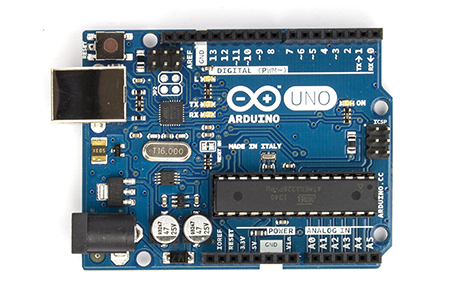
Arduino is an ecosystem:
Arduino Hardware:
USB interface (can power from USB)
“Arduino is a tool for making computers that can sense and control more of the physical world than your desktop computer. It's an open-source physical computing platform based on a simple microcontroller board, and a development environment for writing software for the board.”
Basically, Arduino is a credit-card sized computer that costs about $20. It is open source hardware and runs open source software. The development environment is cross-platform and runs on Linux, Windows and Mac. It is at the core of the Maker community.
Arduino is an ecosystem:
- Open Source GUI and Compiler (GCC)
- Very simple software framework (wiring)
- Shallow learning curve, even for those with limited electronic and programming experience, but not dumbed down!
- Created so kids to professionals can create hardware/software applications with minimal effort!
- Choice of science fair projects everywhere!
- Open Source Hardware (schematics, board layouts)
- Inexpensive hardware and many choices
- Many “shields” available (network, display, etc.)
- Very active community with extremely extensive resources available for free
- Easy to interface with Linux/Win and Android
- http://openprojectsandapps.org/STEM_arduino.php
- robots, robotics competitions, http://www.arduino.cc/en/Main/Robot
- drones, http://ardupilot.com
- scientific devices and solutions http://blog.arduino.cc/category/science/
- Arduino-powered satellites have launched to ISS
Arduino Hardware:
USB interface (can power from USB)
5V or 3.3V (7-12V input)
ATmega328 CPU (8-bit, 8/16 MHz)
14 digital I/O (6 can provide PWM)
6 analog input pins (10-bit)
1 UART
2K RAM, 32K Flash (.5K bootloader)
1K EEPROMI2C, SPI interfaces
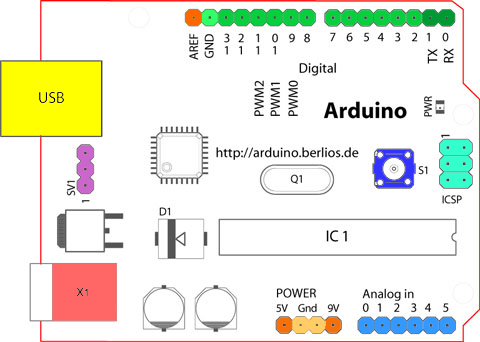
ATmega328 CPU (8-bit, 8/16 MHz)
14 digital I/O (6 can provide PWM)
6 analog input pins (10-bit)
1 UART
2K RAM, 32K Flash (.5K bootloader)
1K EEPROMI2C, SPI interfaces
Where Can I get One:
- Official Store: http://store.arduino.cc/
- Adafruit: https://www.adafruit.com/
- Robotshop: http://www.robotshop.com/
- Seed Studios: http://www.seeedstudio.com/
- Sparkfun: http://sparkfun.com/
- Aliexpress: http://www.aliexpress.com/
- Many, many more stores all over the Internet!
Note, these notes are from a presentation I gave at FredLUG on 4/25.
I'll try to make the full set of slides available and link here or in a future post.
I am a engineer/MBA developer/manager focusing on open source solutions. I manage several teams, most working with Linux solutions.
What Can You Do With Arduino
I've had a lot of fun recently building gadgets with my Arduino and Maple Mini systems. When I showed a picture of what I built, several people asked "but what can it do"? Good question.
From the perspective of most people using modern computers (desktops, laptops, tablets, smart phones), the lowly Arduino is a toy. You can't browse the Internet on it (at least not very well, maybe in text mode and very slowly). You can't play YouTube or Netflix on it. It does not connect to a VGA or HDMI monitor, nor have a USB port for a keyboard or mouse. While the Maple is a bit faster, it still has the same limitations. What good is Arduino?
People seem to forget what our early computers were like. My first computer had 128 bytes of RAM, a 2K boot EPROM, and 4 MHz processor. Input was via a HEX keypad and display was on 7-segment LEDs. Program storage was to a tape player. The Arduino blows this away. The Maple is no comparison, with a 72 MHz processor, 20K RAM, and 128K flash. Back in those days you HAD to learn something about the hardware do make it do anything useful. Today Arduino is the platform to learn about computing and hardware.
When I started working with embedded systems, most of my software was in assembly and I encoded it by hand, then entered the HEX code directly into the computer. Later, I had an assembler on our VAX mini-computer (1 MIPS, slower than an Arduino, but supporting 50+ users). We also had emulators costing $5000 or more (very unreliable). These allowed us to download our code directly to the system we were testing and debug it. A minimal embedded system was a dozen or so chips and took up many times the space of Arduino today. Today we can get started with an Arduino with a retail cost of $
This is where the fun starts!
But what can you build with Arduino (and Arduino-like systems)? Some people build projects to learn hardware and software. Arduino is used for music projects to play music, visualize music, etc. Some hack toys to add motion, sounds, interactions, etc. There is an entire community using Arduino to build autopilots for drones. Arduino has been used for biometrics and you can buy an EKG shield. There are even projects to build Arduino gaming systems.
Arduino is not just about technology, but also Art. There are sites dedicated to Arduino for artists.
It is at the forefront of wearable computing like the Adafruit FLORA wearable system.
The Arduino platform is very simple to setup and use. Kids in middle school have used it to create science fair projects. There are many articles about using Arduino in the classroom. Why not, the cost is low and the performance is high. Kids can learn to write very simple programs and get nearly-immediate feedback on what they wrote. The software is free, open source, and easy to setup and use. All you need is a modern PC/laptop, modern O/S (Win/Mac/Linux), and a USB cable.
Google the Internet for top Arduino projects and you will find articles like Hacknmod top Arduino projects listing some really cool, pretty, and fun projects.
Today we use Arduino and similar systems nearly anywhere that you would have used a custom microprocessor board 10 or 20 years ago. It is expanding the reach of computing to new areas including artists and hobbyists who would never have used a computer a few years ago. New industries are being created such as the maker communities including companies like Adafruit and Spark Fun.
You can get the Arduino from many source including Adafruit and Spark Fun for $10 and up (or less for clones). The development environment is free and available for Windows, Mac, and Linux. Download it from the Arduino site or install in your favorite operating system (Fedora: yum install arduino, Ubuntu: apt-get install ubuntu).
You can get the Maple Mini from SparkFun and clones from various sources on the Internet for as low as $5. Not bad for a 72 MHz computer faster than your Windows 95 desktop a few years back.
Happy Hardware Hacking!
From the perspective of most people using modern computers (desktops, laptops, tablets, smart phones), the lowly Arduino is a toy. You can't browse the Internet on it (at least not very well, maybe in text mode and very slowly). You can't play YouTube or Netflix on it. It does not connect to a VGA or HDMI monitor, nor have a USB port for a keyboard or mouse. While the Maple is a bit faster, it still has the same limitations. What good is Arduino?
People seem to forget what our early computers were like. My first computer had 128 bytes of RAM, a 2K boot EPROM, and 4 MHz processor. Input was via a HEX keypad and display was on 7-segment LEDs. Program storage was to a tape player. The Arduino blows this away. The Maple is no comparison, with a 72 MHz processor, 20K RAM, and 128K flash. Back in those days you HAD to learn something about the hardware do make it do anything useful. Today Arduino is the platform to learn about computing and hardware.
When I started working with embedded systems, most of my software was in assembly and I encoded it by hand, then entered the HEX code directly into the computer. Later, I had an assembler on our VAX mini-computer (1 MIPS, slower than an Arduino, but supporting 50+ users). We also had emulators costing $5000 or more (very unreliable). These allowed us to download our code directly to the system we were testing and debug it. A minimal embedded system was a dozen or so chips and took up many times the space of Arduino today. Today we can get started with an Arduino with a retail cost of $
This is where the fun starts!
But what can you build with Arduino (and Arduino-like systems)? Some people build projects to learn hardware and software. Arduino is used for music projects to play music, visualize music, etc. Some hack toys to add motion, sounds, interactions, etc. There is an entire community using Arduino to build autopilots for drones. Arduino has been used for biometrics and you can buy an EKG shield. There are even projects to build Arduino gaming systems.
Arduino is not just about technology, but also Art. There are sites dedicated to Arduino for artists.
It is at the forefront of wearable computing like the Adafruit FLORA wearable system.
The Arduino platform is very simple to setup and use. Kids in middle school have used it to create science fair projects. There are many articles about using Arduino in the classroom. Why not, the cost is low and the performance is high. Kids can learn to write very simple programs and get nearly-immediate feedback on what they wrote. The software is free, open source, and easy to setup and use. All you need is a modern PC/laptop, modern O/S (Win/Mac/Linux), and a USB cable.
Google the Internet for top Arduino projects and you will find articles like Hacknmod top Arduino projects listing some really cool, pretty, and fun projects.
Today we use Arduino and similar systems nearly anywhere that you would have used a custom microprocessor board 10 or 20 years ago. It is expanding the reach of computing to new areas including artists and hobbyists who would never have used a computer a few years ago. New industries are being created such as the maker communities including companies like Adafruit and Spark Fun.
You can get the Arduino from many source including Adafruit and Spark Fun for $10 and up (or less for clones). The development environment is free and available for Windows, Mac, and Linux. Download it from the Arduino site or install in your favorite operating system (Fedora: yum install arduino, Ubuntu: apt-get install ubuntu).
You can get the Maple Mini from SparkFun and clones from various sources on the Internet for as low as $5. Not bad for a 72 MHz computer faster than your Windows 95 desktop a few years back.
Happy Hardware Hacking!
I am a engineer/MBA developer/manager focusing on open source solutions. I manage several teams, most working with Linux solutions.
Sunday, April 19, 2015
TMS and DBMS
I've recently been working with my siblings to clean out our parent's house. They passed away a few years ago and we are finally cleaning out their home of nearly 50 years. The house is in FL and I live in VA, so it makes for a difficult trip, both emotionally and physically. My wife and I came back with a van loaded with boxes and boxes of things to save, mainly books, china, and crystal....
One thing I've learned, is that my parents had TMS -- Too Much Stuff. My wife and I are suffering from TMS too. We hope to keep the stuff minimized and organized for our kids, however our attic is expanding and filling up with more and more stuff.
I've learned a lot about organization by going through my parent's stuff. My mom was a great organizer of parties and civic events. When she began the Spring Pilgrimage to help restore the Thomas Center in Gainesville, she kept all her plans, correspondence, and notes. We have letters to and from the city discussing the event and thanking her for chairing the event. We have party lists including menus and drink lists. She kept EVERYTHING -- leading to TMS.
A friend has DBMS on his desk. Database? No: Don't Buy More Stuff. We suffer from that as well. As we get rid of more stuff, we end up buying more at garage sales and antique shops. I need to frame DBMS over my front door.... Wait, I just got another package with more electronic parts and Arduinos!
How does this tie in with the normal theme of this blog? Organization! I am a mess with physical organization, but I keep my files organized and replicated. I am a strong supporter of version control systems like Subversion (free, open source, runs on Linux, etc.). However, I do tend to keep TOO MUCH digitally. I'll discuss my digital organization in a subsequent post (hopefully).
I can't digitize and electronically organize all my documents, books, videos, crystal, china, etc. I am trying to digitize old photos (yes, I have an 1800's photo folder). It's a long, difficult process.
One fear with digitization is the fear of my documents not being readable in the future, a so-called digital dark age. I try to use open and widely-supported formats, however.... This will be a subject for a subsequent post!
One thing I've learned, is that my parents had TMS -- Too Much Stuff. My wife and I are suffering from TMS too. We hope to keep the stuff minimized and organized for our kids, however our attic is expanding and filling up with more and more stuff.
I've learned a lot about organization by going through my parent's stuff. My mom was a great organizer of parties and civic events. When she began the Spring Pilgrimage to help restore the Thomas Center in Gainesville, she kept all her plans, correspondence, and notes. We have letters to and from the city discussing the event and thanking her for chairing the event. We have party lists including menus and drink lists. She kept EVERYTHING -- leading to TMS.
A friend has DBMS on his desk. Database? No: Don't Buy More Stuff. We suffer from that as well. As we get rid of more stuff, we end up buying more at garage sales and antique shops. I need to frame DBMS over my front door.... Wait, I just got another package with more electronic parts and Arduinos!
How does this tie in with the normal theme of this blog? Organization! I am a mess with physical organization, but I keep my files organized and replicated. I am a strong supporter of version control systems like Subversion (free, open source, runs on Linux, etc.). However, I do tend to keep TOO MUCH digitally. I'll discuss my digital organization in a subsequent post (hopefully).
I can't digitize and electronically organize all my documents, books, videos, crystal, china, etc. I am trying to digitize old photos (yes, I have an 1800's photo folder). It's a long, difficult process.
One fear with digitization is the fear of my documents not being readable in the future, a so-called digital dark age. I try to use open and widely-supported formats, however.... This will be a subject for a subsequent post!
I am a engineer/MBA developer/manager focusing on open source solutions. I manage several teams, most working with Linux solutions.
Sunday, March 15, 2015
Random Linux and OSS Thoughts
Just some random thoughts....
I've been working with Docker lately. It is a great tool for containers (more or less like light virtualization) and I have several use cases that could use it for things I am developing! I now have Docker working on one Fedora desktop and two Fedora laptops, including my RedNeck Model 1 (a very old Gateway 1st gen 64-bit laptop held together by packing tape).
Last weekend (2/28), we had a great FredLug (http://fredlug.info/) meeting in Stafford on Docker. Thank you Jamie Duncan from Red Hat for a great presentation!
Please note that FredLug (http://fredlug.info/) is planning a meeting on Linux in the Movie Industry on Tuesday, April 7th. The presenter will be Klaatu who I met a few years ago at SouthEast Linux Fest. Klaatu works on Linux and filmmaking at an international Oscar-winning visual effects studio in Wellington, New Zealand. This will be VERY interesting (however I may have to miss it).
From a posting by a fellow member of FredLug:
At FredLug we're having a guest speaker from far away on the other side
of the world come and talk to us how movies are being made with Linux,
Open Source and all kinds of stuff that our LUGs talk about all the time.
Klaatu will speak not as a representative of his work place which
produces big blockbuster movie special effects, but as a community
member and open source evangelist - cover the types of tools being used
to create these amazing movie effects.
Please consider joining us - it's on a unusual day and time: April 7
(Tuesday) at 7.15pm to 8.45pm - at the Rappahanoc Regional Library in
Fredericksburg. If you know someone who are interested in either the art
of making movies or how Open Source creates new avenues for progress, or
both - please share this event with them, and please have them (and you)
sign up on the meetup page. We've reserved a room large enough to cover
quite a crowd but we still need to have an idea about how many are
planning to come.
For comparison, I as I mentioned in my blog post on Superfish Bites, my wife's new Lenovo Winblows 8.1 laptop seems to be working well again after addressing CERT Alert TA15-051A on Superfish. I don't do Windows, but when I must, I slog through it. Working with Windows is the best way to raise my blood pressure. Total time to fix the laptop (so far) is about 3 hours. I wonder if I can bill Lenovo or Best Buy for my 3 hours (worth more than what I paid for the laptop).
I've been working with Docker lately. It is a great tool for containers (more or less like light virtualization) and I have several use cases that could use it for things I am developing! I now have Docker working on one Fedora desktop and two Fedora laptops, including my RedNeck Model 1 (a very old Gateway 1st gen 64-bit laptop held together by packing tape).
Last weekend (2/28), we had a great FredLug (http://fredlug.info/) meeting in Stafford on Docker. Thank you Jamie Duncan from Red Hat for a great presentation!
Please note that FredLug (http://fredlug.info/) is planning a meeting on Linux in the Movie Industry on Tuesday, April 7th. The presenter will be Klaatu who I met a few years ago at SouthEast Linux Fest. Klaatu works on Linux and filmmaking at an international Oscar-winning visual effects studio in Wellington, New Zealand. This will be VERY interesting (however I may have to miss it).
From a posting by a fellow member of FredLug:
At FredLug we're having a guest speaker from far away on the other side
of the world come and talk to us how movies are being made with Linux,
Open Source and all kinds of stuff that our LUGs talk about all the time.
Klaatu will speak not as a representative of his work place which
produces big blockbuster movie special effects, but as a community
member and open source evangelist - cover the types of tools being used
to create these amazing movie effects.
Please consider joining us - it's on a unusual day and time: April 7
(Tuesday) at 7.15pm to 8.45pm - at the Rappahanoc Regional Library in
Fredericksburg. If you know someone who are interested in either the art
of making movies or how Open Source creates new avenues for progress, or
both - please share this event with them, and please have them (and you)
sign up on the meetup page. We've reserved a room large enough to cover
quite a crowd but we still need to have an idea about how many are
planning to come.
For comparison, I as I mentioned in my blog post on Superfish Bites, my wife's new Lenovo Winblows 8.1 laptop seems to be working well again after addressing CERT Alert TA15-051A on Superfish. I don't do Windows, but when I must, I slog through it. Working with Windows is the best way to raise my blood pressure. Total time to fix the laptop (so far) is about 3 hours. I wonder if I can bill Lenovo or Best Buy for my 3 hours (worth more than what I paid for the laptop).
I am a engineer/MBA developer/manager focusing on open source solutions. I manage several teams, most working with Linux solutions.
Wednesday, March 11, 2015
Weekly Report “Extra” Bullets
Back in 2010, I decided to do a social experiment. I was required to generate a short, bullet-format, weekly report for management. Naturally, I wondered if anyone was reading it, so from the end of October until the end of the following January, I added a "special" bullet to each report.
The sad thing is I kept it up for over 3 months and I received NO comments or questions on any of these bullets (only my immediate boss was in on the joke). Either manglement thought thought we were working on something like finding the Higgs at the LHC, or were they were totally clueless (most likely the latter).
Special thanks are extended to Wikipedia, CERN, and several other sites for source material!
The sad thing is I kept it up for over 3 months and I received NO comments or questions on any of these bullets (only my immediate boss was in on the joke). Either manglement thought thought we were working on something like finding the Higgs at the LHC, or were they were totally clueless (most likely the latter).
Special thanks are extended to Wikipedia, CERN, and several other sites for source material!
- Began preliminary dialog addressing advanced transformative XW electroweak symmetry breaking for quantum information transference. After detailed analysis of XW using volumetric interpretation to analyze the possibility of quantum quench of the primary loop, a covariant derivative was considered as a potential long-to-medium range solution.
- Continued dialog addressing advanced transformative XW electroweak symmetry breaking for quantum information transference. Utilized the covariant derivative to optimize the transference in accordance with scalar O(n) gauge theory and to verify that the Lagrangian is invariant under the transformation.
- Continued advancing activities related to the dialog addressing advanced transformative XW electroweak symmetry breaking for quantum information transference. Reviewed procedures for adding an extra Higgs field to gauge theory for creating a non-zero mass. This can impact the seamless flow of information transference.
- Began addressing improving seamless flow of information transference using discoveries related to transformative XW electroweak symmetry breaking for quantum computing via massive scalar Higgs particles. Utilized extensions to the standard model to identify additional elementary scalar bosons (spin-0 particles) in the XW problem space.
- Thanksgiving: Began addressing improved information transference utilizing quantum analysis of nucleotide bases obtained using Massively Parallel Signature Sequencing of the Meleagris gallopavo associated with the compressed perennial Solanum tuberosum of the Solanaceae family and wadding incorporating formulation of Crassostrea gigas.
- Continued addressing improved discrete information transference utilizing quantum analysis of nucleotide bases obtained using Massively Parallel Signature Sequencing. This is being used to identify and quantify transcripts present in test samples, revealing the next four bases for a new round of hybridization to encoders and image acquisition.
- Hanukkah: Continued addressing improved discrete information transference using MPSS and utilizing Olea europaea light sources burning for eight days. The phenolic content is being used to identify and quantify transcripts present in test samples and expedite image acquisition.
- Began analyzing optimizations to discrete information transference through analysis of the sensitivity to initial conditions of multiple dynamical systems. This effort will facilitate analysis of the widely diverging outcomes of the deterministic transference and will utilize recurrence plots and Poincare maps as analytical tools. Optimizations to the transference will reduce the chaotic behavior of the chaotic dynamics of the topologically mixing within the XW system.
- Yultide, Christmas, 12/21/2010 lunar eclipse: Continued analyzing optimizations to discrete information transference through analysis of optical properties of the fruma jiuleis total penumbral event and avoided noise due to lycanthropy.
- New Year: Continued analyzing optimizations to discrete information transference through analysis of optical properties of the 23M descent of the lechatelierite orb at the interval U+5h.
- Began prototyping a transition from bradyons to tachyons to improve discrete information transference. Tachyonic fields are being investigated to reduce the probability of theorized causality violation described by the mathematics of simultaneity in standard relativity. These help with the spontaneous symmetry breaking in the unstable field vacuum.
- Lee-Jackson Day: Began evaluating methods of compensation for drift of UT1 as determined by very long baseline interferometry resulting in difficulties of the measurements of transactions during discrete information transference. Analyzed the Lee-Jackson effects on these measurements as processed through a Lee Jackson tube amplifier system with carefully controlled distortion.
- NanoSail D: Continued evaluating methods of compensation for drift of UT1 by analyzing the orbital elements for NS-D and decoding the 437.270 MHz beacon. Distortions in the LJ techniques resulted in difficulties of the measurements of transactions during discrete information transference.
- Bahamas: Continued evaluating methods of UTC1 drift compensation for ship-based systems in the baja mar. If these system avoid violations of the UNCLOS by private parties, we plan on additional testing when units are returned from the islands previously occupied by the Lucayans. These activities should improve the discrete information transference.
I am a engineer/MBA developer/manager focusing on open source solutions. I manage several teams, most working with Linux solutions.
Friday, March 6, 2015
Software That Kills
Can Software Kill?
...um, yes....The real question is how many have been killed by software!
In a previous post, I discussed Toyota's Killer Software which most-likely has resulted in dozens of deaths. However, cars are not the only devices with software that has killed humans. Between 1985 and 1987 at least 6 people were given massive amounts of radiation by broken software in the Therac-25 radiation therapy machine, resulting in at least 3 deaths.
Other medical devices may have software that has killed. The Software Freedom Law Center is calling for transparency in implantable medical devices (IMD) and mentions at least 6 recalls of IMDs by the FDA due to bad software. It would really make your day to have your pacemaker or insulin pump malfunction and send you to the ER or morgue.
Weapon systems have had major software failures too. In 1991, a Patriot missile battery experienced a software error in time calculation. This caused it to not be able to intercept a Scud missile resulting in the deaths of 28 soldiers.
Software doesn't have to kill to cause a lot of damage. This list of computer software blunders has some great stories and lessons for us all. Here are a few more including exploding rockets with the wrong software....
Clearly, software used in critical functions needs to be tested and evaluated. It needs to be evaluated by 3rd parties and must be developed using well-defined, controlled, audit-able processes. Software engineers and programmers need to do a MUCH better job.
Now are you ready for that self-driving car? Will it be safe? "Yes, it's safe! Trust Us!"
I am a engineer/MBA developer/manager focusing on open source solutions. I manage several teams, most working with Linux solutions.
Thursday, February 26, 2015
Superfish Bites
I LOVE Sushi. Fish is one of my favorite foods. However Superfish is totally evil, and should be outlawed. It's even WORSE than the Snakehead, an invasive fish (the world record was caught a few miles from my house in Aquia Creek).
For those of you who don't know what Superfish is, it is a Windows program that INTERCEPTS YOUR HTTPS TRAFFIC. It is installed on new Lenovo laptops, including my wife's, to give a better advertising experience. The end result however is INSECURITY, and an even slower browsing experience (making it next to useless at times).
Those of you who know me know that I typically use Linux. I try to avoid Windows whenever I can, having been bitten repeatedly over the years. At Christmas, I bought a Lenovo laptop for my wife so she could work with "official" Microsoft Windows and "official" Microsoft Office. It was fairly inexpensive and came with the latest Windows 8.1 However, it seemed a bit slow and Win8 is a challenge (I'm being nice).
Last week, this new laptop needed to be rebooted to install updates. After reboot, browsing was DEAD. It could not load ANYTHING. Powershell could ping sites by name so 1) TCP/IP worked, and 2) DNS worked. I found some obscure powershell commands to reset the network stack and things seemed to be OK. However this week I saw the CERT article about Superfish on Lenovo. Oops, that's what we have.
I called Best Buy and spoke with Geek Squad who wanted $199 for spyware removal ON A BRAND NEW LAPTOP. As a result, I've spent about 3 hours of my time (billable at over $100/hour) fixing this problem. This is like buying a new, computer-controlled stove only to find that the front-left burner won't work, and having the store REFUSE to fix it because its a software problem from the vendor.
Today (snow day), I finally got Superfish removed. Total time reading about it and removing it: approx. 3 hours (or equivalent to what we paid for the laptop in the first place).
For more info see this post: CERT.GOV
Apparently, today http://www.lenovo.com was hacked because of anger over Superfish, see this page.
Also somehow this new laptop has Taplica, a browser-hijacker that took over the home pages on both Chrome and MSIE. Yet more crap to remove!
Did I mention that I really don't like Windows......
Please use Linux or Mac. Some versions I recommend:
Fedora - Free Linux distribution sponsored by Red Hat
CentOS - Free Linux for enterprises also sponsored by Red Hat (or use RHEL)
Ubuntu - Free Linux, very good for desktops and general browsing
BTW, this was posted from our Lenovo T60 (formerly IBM T60) which is 5+ years old, runs Fedora 20, and has a solid state drive. It survived a 3 foot fall from the table to a hard floor during the 2011 VA earthquake (pre-SSD). Its browser worked, so I was able to look up all the obscure commands and removal instructions necessary to fix the BRAND NEW Windows 8.1 laptop from Best Buy.
Why Lenovo? They made the IBM stinkpads for years before buying the line from IBM. I've had two IBM stinkpads at work (first was a 486). They were great and lasted forever (well beyond when corporate wanted us to turn them back in). Will's college laptop was a Lenovo, and I purchased the refurbished T60 from Geeks.com (RIP) and it still works very well.... Good products, but made in China.
For those of you who don't know what Superfish is, it is a Windows program that INTERCEPTS YOUR HTTPS TRAFFIC. It is installed on new Lenovo laptops, including my wife's, to give a better advertising experience. The end result however is INSECURITY, and an even slower browsing experience (making it next to useless at times).
Those of you who know me know that I typically use Linux. I try to avoid Windows whenever I can, having been bitten repeatedly over the years. At Christmas, I bought a Lenovo laptop for my wife so she could work with "official" Microsoft Windows and "official" Microsoft Office. It was fairly inexpensive and came with the latest Windows 8.1 However, it seemed a bit slow and Win8 is a challenge (I'm being nice).
Last week, this new laptop needed to be rebooted to install updates. After reboot, browsing was DEAD. It could not load ANYTHING. Powershell could ping sites by name so 1) TCP/IP worked, and 2) DNS worked. I found some obscure powershell commands to reset the network stack and things seemed to be OK. However this week I saw the CERT article about Superfish on Lenovo. Oops, that's what we have.
I called Best Buy and spoke with Geek Squad who wanted $199 for spyware removal ON A BRAND NEW LAPTOP. As a result, I've spent about 3 hours of my time (billable at over $100/hour) fixing this problem. This is like buying a new, computer-controlled stove only to find that the front-left burner won't work, and having the store REFUSE to fix it because its a software problem from the vendor.
Today (snow day), I finally got Superfish removed. Total time reading about it and removing it: approx. 3 hours (or equivalent to what we paid for the laptop in the first place).
For more info see this post: CERT.GOV
Apparently, today http://www.lenovo.com was hacked because of anger over Superfish, see this page.
Also somehow this new laptop has Taplica, a browser-hijacker that took over the home pages on both Chrome and MSIE. Yet more crap to remove!
Did I mention that I really don't like Windows......
Please use Linux or Mac. Some versions I recommend:
Fedora - Free Linux distribution sponsored by Red Hat
CentOS - Free Linux for enterprises also sponsored by Red Hat (or use RHEL)
Ubuntu - Free Linux, very good for desktops and general browsing
BTW, this was posted from our Lenovo T60 (formerly IBM T60) which is 5+ years old, runs Fedora 20, and has a solid state drive. It survived a 3 foot fall from the table to a hard floor during the 2011 VA earthquake (pre-SSD). Its browser worked, so I was able to look up all the obscure commands and removal instructions necessary to fix the BRAND NEW Windows 8.1 laptop from Best Buy.
Why Lenovo? They made the IBM stinkpads for years before buying the line from IBM. I've had two IBM stinkpads at work (first was a 486). They were great and lasted forever (well beyond when corporate wanted us to turn them back in). Will's college laptop was a Lenovo, and I purchased the refurbished T60 from Geeks.com (RIP) and it still works very well.... Good products, but made in China.
I am a engineer/MBA developer/manager focusing on open source solutions. I manage several teams, most working with Linux solutions.
Friday, February 13, 2015
Toyota's Killer Software
For several years Toyota has been involved in a series of lawsuits claiming that Toyota cars have accelerated out of control, resulting in about 89 or more deaths. These include Camry and are as recent as the 2010 model year (note, we own a 2011 Camry).
Toyota initially blamed these problems on floor mats and recalled millions of cars. They said the mat could stick under the accelerator pedal and cause the car to accelerate out of control. Later, Toyota blamed some problems on bad electronics in the accelerator pedal (tin whiskers).
Now it is now coming to light that the Toyota problems could be due to bad engine control software: Toyota Single Bit Flip That Kills. Can software kill? Yes (I am working on another post about that -- watch this space).
Toyota spent YEARS and multiple recalls addressing runaway acceleration of Camry and other vehicles. They worked with NASA on a high-level review (no software fault found) and the US Government NHTSA. The result: they blamed the problems on the floor mats. The solution, replacing floor mats and fixing accelerator pedals. However, after investigation by embedded software experts at the Barr Group (see this blog entry) for a jury trial, the unintended acceleration has been largely determined to be due to very bad software in the engine control module. These issues, plus lying to Congress and the NHTSA have resulted in a $1.2B fine by Toyota and another about $1.7B in settlements.
The finding is very damaging: "a systematic software malfunction in the Main CPU that opens the throttle without operator action and continues to properly control fuel injection and ignition” that is not reliably detected by any fail-safe." (Ref) Toyota admitted to lying to NHTSA, Congress and the public, however there have not been safety recalls for defective engine control software.
These Toyota slides have a lot of technical details on the problems in the software.
Just how expensive is Toyota's software taking this into account? For comparison, the software developed for the Space Shuttle cost about $1000/line of code for the best tested software in history. Toyota's engine controller consists of about 1M lines of code and Toyota has paid fines of $1.2B (and a lot more to settle lawsuits) resulting in a cost per line of code of $1200 (or $2800 if lawsuits are included). Well-tested, very clean code (Shuttle) or well-litigated, sloppy, dangerous code (Toyota). Take your pick.... The result is Toyota's software is more expensive than the Space Shuttle's software!
What about those deaths versus flying? In the US, there have been 53 airline deaths the last 10 years versus 89+ deaths due to faulty Toyota software (source).
Clearly, software used in critical functions needs to be tested and evaluated. It needs to be evaluated by 3rd parties and must be developed using well-defined, controlled, audit-able processes. Software engineers and programmers need to do a MUCH better job.
BTW, the Toyota code is the opposite of open source -- it was reviewed in a secure, locked room with no phones or notebooks allowed.
Could the problem be that the automakers are focusing on NEW FEATURES and not on reliability and usability? It's not just the automakers, for example we seen that before with Windows Vista and Windows 8, spawning posts like "8 Reasons why Windows 8 Sucks"? However, how many deaths can be attributed to bad desktop software like Windows Vista (possibly a few heart attacks due to raised blood pressure)?
Toyota initially blamed these problems on floor mats and recalled millions of cars. They said the mat could stick under the accelerator pedal and cause the car to accelerate out of control. Later, Toyota blamed some problems on bad electronics in the accelerator pedal (tin whiskers).
Now it is now coming to light that the Toyota problems could be due to bad engine control software: Toyota Single Bit Flip That Kills. Can software kill? Yes (I am working on another post about that -- watch this space).
Toyota spent YEARS and multiple recalls addressing runaway acceleration of Camry and other vehicles. They worked with NASA on a high-level review (no software fault found) and the US Government NHTSA. The result: they blamed the problems on the floor mats. The solution, replacing floor mats and fixing accelerator pedals. However, after investigation by embedded software experts at the Barr Group (see this blog entry) for a jury trial, the unintended acceleration has been largely determined to be due to very bad software in the engine control module. These issues, plus lying to Congress and the NHTSA have resulted in a $1.2B fine by Toyota and another about $1.7B in settlements.
The finding is very damaging: "a systematic software malfunction in the Main CPU that opens the throttle without operator action and continues to properly control fuel injection and ignition” that is not reliably detected by any fail-safe." (Ref) Toyota admitted to lying to NHTSA, Congress and the public, however there have not been safety recalls for defective engine control software.
These Toyota slides have a lot of technical details on the problems in the software.
Just how expensive is Toyota's software taking this into account? For comparison, the software developed for the Space Shuttle cost about $1000/line of code for the best tested software in history. Toyota's engine controller consists of about 1M lines of code and Toyota has paid fines of $1.2B (and a lot more to settle lawsuits) resulting in a cost per line of code of $1200 (or $2800 if lawsuits are included). Well-tested, very clean code (Shuttle) or well-litigated, sloppy, dangerous code (Toyota). Take your pick.... The result is Toyota's software is more expensive than the Space Shuttle's software!
What about those deaths versus flying? In the US, there have been 53 airline deaths the last 10 years versus 89+ deaths due to faulty Toyota software (source).
- 2005: 1 on ground in Chicago
- 2009: 49 Buffalo, plus 1 on the ground
- 2013: 3 San Francisco (pilot error)
Clearly, software used in critical functions needs to be tested and evaluated. It needs to be evaluated by 3rd parties and must be developed using well-defined, controlled, audit-able processes. Software engineers and programmers need to do a MUCH better job.
BTW, the Toyota code is the opposite of open source -- it was reviewed in a secure, locked room with no phones or notebooks allowed.
Could the problem be that the automakers are focusing on NEW FEATURES and not on reliability and usability? It's not just the automakers, for example we seen that before with Windows Vista and Windows 8, spawning posts like "8 Reasons why Windows 8 Sucks"? However, how many deaths can be attributed to bad desktop software like Windows Vista (possibly a few heart attacks due to raised blood pressure)?
Now are you ready for that self-driving car? Will it be safe?
"Yes, it's safe! Trust Us!"
I am a engineer/MBA developer/manager focusing on open source solutions. I manage several teams, most working with Linux solutions.
Subscribe to:
Posts (Atom)